Support the for clickpad on Ubuntu is still a bit flaky. Not only are advanced features like enhanced gesture support and multitouch not available out of the box on Ubuntu. Other basic features like right clicking, horizontal scrolling, click and drag etc can be quite a hassle. On Ubuntu 10.04 some of the basic features have been fixed (although multitouch support is still lacking).
Same thing can not be said of Ubuntu 10.10 because there was a regression which make it impossible to right click using the touchpad. Already a bug has been filled concerning the issue which should hopefully be fixed during the Maverick release circle.
Walk Around
The Good news is there is a walk around this issue for those who won’t mind getting their hands dirty with messing around with the command-line. The walk around involves using a psmouse patch submitted by Paul which fixes the issue. (At least for me)
For this walk around some packages would have to be installed namely the build-essential package and the dkms packages. Build-essentials helps install basic tools needed for compiling packages from source, while the dkms ”is a framework designed to allow individual kernel modules to be upgraded without changing the whole kernel. It is also very easy to rebuild modules as you upgrade kernels. framework designed to allow individual kernel modules to be upgraded without changing the whole kernel. It is also very easy to rebuild modules as you upgrade kernels.” which in English means whatever module we patch would not need to be repatched should the system’s kernel be upgraded. (At least that’s the idea)
sudo apt-get install dkms build-essential
The fix involves patching the psmouse module using the paul’s archive which is the mouse source directory for linux 2.6.35-22-generic (The version of Linux Kernal which shipped with Ubuntu 10.10 as at blog time)
First download the archive file from here
save the downloaded file to your desktop
Open a terminal (Application/Accessories/Terminal – Kubuntu users should go /System/Konsole)
Move to the Directory where the archive was saved (In this case the desktop) and extract the content of the archive
cd $HOME/Desktop && tar xvf psmouse-2.6.35-22-generic-patched.tar.bz2.tar
The name of the package as changed since writing this post the new command which reflects the change is
cd $HOME/Desktop && tar jxvf psmouse-2.6.35-22-generic-patched.tar.bz2
Move the extracted folder to /usr/src which is under the root directory hence the command would have to be executed with sudo
sudo mv psmouse-2.6.35-22-generic /usr/src
Move into the /usr/src directory
cd /usr/src
Then install the psmouse module with the following commands running them one after the other
sudo dkms add -m psmouse -v 2.6.35-22-generic
sudo dkms build -m psmouse -v 2.6.35-22-generic
sudo dkms install -m psmouse -v 2.6.35-22-generic
Once installed reboot for the module to be loaded.
If you are still having issues with right clicks. This command would help check if the psmodule is installed
sudo dkms status -m psmouse -v 2.6.35-22-generic
The output should be something like this
psmouse, 2.6.35-22-generic, 2.6.35-22-generic, i686: installed
If it is not installed. It can always be rebuilt with the following command
sudo dkms build -m psmouse -v 2.6.35-22-generic
sudo dkms install -m psmouse -v 2.6.35-22-generic
In case you followed this guide and it did not work for you, or Ubuntu releases an official fix for the issue (in which case you would have to remove the changes made following this guide to prevent conflicts) or for some reason you would like to revert the changes made following this guide. simply do
sudo dkms uninstall -m psmouse -v 2.6.35-22-generic
sudo dkms remove -m psmouse -v 2.6.35-22-generic --all
Following this guide does not lead to the nirvana of clickpad awesomeness (at least not for me). There are still some issues with Jumpy mouse which also affect windows 7. However it does make the clickpad much more useful under Ubuntu even then I would suggest that for serious work it won’t hurt to have a mouse handy :D
NB You can track the bug concerning this issue here
Thanks to Paul and Tob who really helped with the patch which fixes this issue.
I hope someone finds this useful.
jeudi 21 avril 2011

vendredi 25 février 2011
Dead Drops
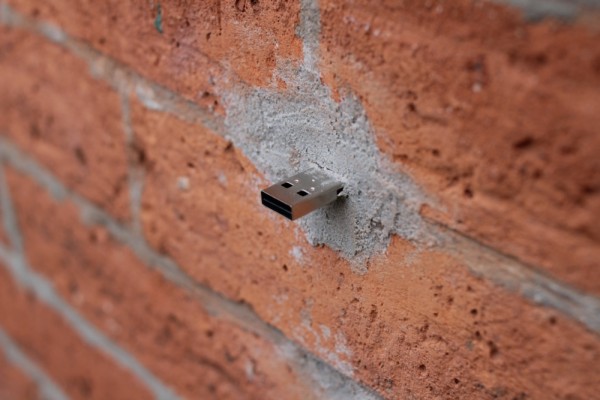
‘Dead Drops’ is an anonymous, offline, peer to peer file-sharing network in public space. USB flash drives are embedded into walls, buildings and curbs accessable to anybody in public space. Everyone is invited to drop or find files on a dead drop. Plug your laptop to a wall, house or pole to share your favorite files and data. Each dead drop is installed empty except a readme.txt file explaining the project. ‘Dead Drops’ is open to participation. If you want to install a dead drop in your city/neighborhood follow the ‘how to’ instructions and submit the location and pictures.
Moblin
Moblin is an open source project focused on building a Linux-based platform optimized for the next generation of mobile devices including Netbooks, Mobile Internet Devices, and In-vehicle infotainment systems.
Moblin, short for 'mobile Linux', was an open source operating system and application stack for Mobile Internet Devices (MIDs), netbooks, nettops and embedded devices.[1] Now it is called MeeGo. Built around the Intel Atom processor, current builds are designed to minimize boot times and power consumption to create a netbook and MID-centric operating system. The netbook/desktop version of Moblin currently supports other chipsets based on the SSSE3 instruction set, such as the Core2 and some Celeron processors.
Commercial products built around Moblin 2 include a Foxconn netbook[2] and an InvenTech smartphone[3], both announced at Computex 2009. Acer has also announced the replacement of Linpus Linux with Moblin on their Acer Aspire One netbooks.[4][5] For its mobile Internet device class smartphone LG GW990, LG Electronics chose Moblin OS 2.1[6][7]. More recently, Dell began accepting orders for its Ubuntu Moblin Remix, a Canonical Ltd. project that builds Moblin using a more full-featured Ubuntu distribution as base [8]. Mandriva has started to offer Moblin's v2 version to all Mandriva distribution and netbook owners. [9]
At the Consumer Electronics Show in January 2010, MSI and Novell announced the upcoming availability of SUSE Moblin preloaded on the MSI U135 netbook. Following the recent release of Moblin version 2.1, this marks the first original equipment manufacturer (OEM) to sell a fully-supported Intel Atom processor-based netbook running Moblin-based technology to consumers. It was demonstrated at both the MSI and Intel booths at the show.[10] In addition, Samsung showed four netbooks preloaded with SUSE Moblin.
At the Mobile World Congress in February 2010, it was announced that the Moblin project would be merging with Maemo to create the MeeGo mobile software platform.
How to test with a USB drive ?
1) download the image
2) Use 'dd' from the command-line
# dd bs=4096 if=<image file> of=<usb drive>3) Boot your PC from USB Informations from wikipedia : Moblin, short for 'mobile Linux', was an open source operating system and application stack for Mobile Internet Devices (MIDs), netbooks, nettops and embedded devices.[1] Now it is called MeeGo. Built around the Intel Atom processor, current builds are designed to minimize boot times and power consumption to create a netbook and MID-centric operating system. The netbook/desktop version of Moblin currently supports other chipsets based on the SSSE3 instruction set, such as the Core2 and some Celeron processors.
Commercial products built around Moblin 2 include a Foxconn netbook[2] and an InvenTech smartphone[3], both announced at Computex 2009. Acer has also announced the replacement of Linpus Linux with Moblin on their Acer Aspire One netbooks.[4][5] For its mobile Internet device class smartphone LG GW990, LG Electronics chose Moblin OS 2.1[6][7]. More recently, Dell began accepting orders for its Ubuntu Moblin Remix, a Canonical Ltd. project that builds Moblin using a more full-featured Ubuntu distribution as base [8]. Mandriva has started to offer Moblin's v2 version to all Mandriva distribution and netbook owners. [9]
At the Consumer Electronics Show in January 2010, MSI and Novell announced the upcoming availability of SUSE Moblin preloaded on the MSI U135 netbook. Following the recent release of Moblin version 2.1, this marks the first original equipment manufacturer (OEM) to sell a fully-supported Intel Atom processor-based netbook running Moblin-based technology to consumers. It was demonstrated at both the MSI and Intel booths at the show.[10] In addition, Samsung showed four netbooks preloaded with SUSE Moblin.
At the Mobile World Congress in February 2010, it was announced that the Moblin project would be merging with Maemo to create the MeeGo mobile software platform.
Project web site : http://moblin.org/ jeudi 24 février 2011
La TV live en streaming avec mplayer
BFM:
mplayer mms://vipmms9.yacast.net/bfm_bfmtv
à tester :
mplayer mms://vipmms9.yacast.net/bfm_bfmtv
à tester :
- La chaîne parlementaire : mplayer mms://vipmms9.yacast.net/rcs_lcplive
- France 0 : mplayer -playlist http://80.118.196.219/webtv-asx.cgi?channel=france_o
- France 2 : mplayer -playlist http://80.118.196.219/webtv-asx.cgi?channel=france_2
- France 3 : mplayer -playlist http://80.118.196.219/webtv-asx.cgi?channel=france_3
- France 4 : mplayer -playlist http://80.118.196.219/webtv-asx.cgi?channel=france_4
- France 5 : mplayer -playlist http://80.118.196.219/webtv-asx.cgi?channel=france_5
- Arte : mplayer -playlist http://80.118.196.219/webtv-asx.cgi?channel=arte
- Direct 8 : mplayer -playlist http://80.118.196.219/webtv-asx.cgi?channel=direct_8
- NT 1 : mplayer -playlist http://80.118.196.219/webtv-asx.cgi?channel=nt1
- NRJ 12 : mplayer -playlist http://80.118.196.219/webtv-asx.cgi?channel=nrj12
- Euronews : mplayer -playlist http://80.118.196.219/webtv-asx.cgi?channel=euronews
- TV 5 : mplayer -playlist http://80.118.196.219/webtv-asx.cgi?channel=tv5_monde
- Liberty TV : mplayer -playlist http://80.118.196.219/webtv-asx.cgi?channel=liberty_tv
- Beur TV : mplayer -playlist http://80.118.196.219/webtv-asx.cgi?channel=beur_tv
- NRJ Hits : mplayer -playlist http://80.118.196.219/webtv-asx.cgi?channel=nrj_hits
Votre Linux est-il vraiment libre ?
Vous souhaitez savoir si votre Système GNU/Linux est libre ?
Et si ce n’est pas le cas comment faire pour le rendre libre ?
VRMS (Virtual Richard Matthew Stallman ) se charge de ça
Pour l’installer rien de plus simple (en root) :
# apt-get install vrms
Ensuite on le lance dans un terminal (oui pas d’interface graphique) :
# vrms
Et tout de suite les statistiques apparaissent.
Lubuntu ou la distrub linux graphique legère
Lubuntu est une variante d'Ubuntu dont l'environnement de bureau est LXDE (tout comme Kubuntu et Xubuntu qui ont pour environnement de bureau respectivement KDE et Xfce).
Quelques infos sur wikipedia
Voici un comparatif d'utilisattion mémoire en live CD :
Quelques infos sur wikipedia
Voici un comparatif d'utilisattion mémoire en live CD :
- Lubuntu : 57,908 KB
- Xubuntu : 156,852 KB
- Ubuntu : 153,840 KB
- Google Chrome : Le navigateur Web (je préfère Midori)
- Claws Mail : Le client Mail que j'utilise
- Gpicview : Visionneur d'images
- MTpaint : Retouche d'images (beaucoup plus rapide que Gimp)
- Aqualung : Lecteur audio
- SMPlayer : Lecteur vidéo
- Abiword : Le traitement de texte poids plume (mais efficace)
Inscription à :
Articles (Atom)